Maker Pools
Maker Pools are a new way to group one or more Makers together to give you better control in handling your liquidity—specifically in Settings Rules. The ability to group Makers together intelligently has numerous possibilities, for example you can group Makers with similar characteristics like sweepable versus non-sweepable. Maker Pools are also quite flexible in that you can add each Maker to multiple pools, saving you time when you go to configure your Settings Rules.
In addition, Maker Pools are particularly useful when you need to add or remove a Maker from multiple Settings Rules. Rather than having to scan each rule, you can simply add and remove Makers directly in the Maker Pools settings, which then carries over to the Settings Rules.
Maker Pool Settings
Note: As of version 9.1+, Maker Pool settings includes Type and Aggregation Priority. Prior to version 9.1, these settings can be configured in Settings Rules.
|
Maker Pool Name
|
Type a name in the field to identify this group of Makers.
|
|
Aggregation Priority
|
Determines how to prioritize quotes in an Aggregation setup when multiple Makers have the same quoted price.
Note: This field must be set to Maker Priority when the Settings Rule Type is Exchange, Failover, or Ticket.
Options:
- Maker Priority:Quote priority is based on the order of Maker Stream IDs in the Maker Entities section of this Maker Pool.
- Quote Age: Quote priority is given to the most recent quote.
- Quote Volume (High to Low): Quote priority is given to the quote with the most volume.
- Quote Volume (Low to High): Quote priority is given to the quote with the least volume.
|
| Additional Hedge Symbols |
If configured, the Hub subscribes to the symbols listed but does not require a corresponding Settings Rule, to allow for risk management tracking. Takers don't see the symbols listed in Additional Hedge Symbols.
Note: Additional Hedge Symbols is a licensed feature. To obtain a license, contact Contact .
|
| Type |
Determines how quotes from multiple Makers are fed to Takers.
Options:
- Exchange
- Failover
- Simple Aggregation
- Advanced Aggregation
- Matching Aggregation
- Ticket
See for an in-depth explanation of each option.
|
Quote Compatibility Filter
Specifies the compatibility criteria Maker quotes must meet to enter the pool. Quotes that do not match are excluded from aggregation and execution.
| Include Indicative Quotes |
If enabled, both indicative and non-indicative Maker quotes can enter this Maker Pool.
If disabled, indicative quotes are excluded. Indicative quotes provide informational pricing and are not executable.
Note: The Taker Stream must also be configured to send indicative quotes.
|
| Liquidity Type Filter |
Specifies which Maker Stream liquidity types can enter this Maker Pool, such as Sweepable or Full Amount. Select Any to accept all supported liquidity types.
|
| Allow Takers to Receive Axe Streams |
If enabled, Axe liquidity included in this Maker Pool can be forwarded to Taker Streams.
If disabled, Taker Streams cannot receive Axe liquidity from the pool.
Note: Allow Takers to Receive Axe Streams is a licensed feature. To obtain a license, contact .
|
| Include Axe Streams |
If enabled, Maker Axe liquidity can enter this Maker Pool.
If disabled, Axe liquidity is excluded.
Note: To forward included Axe liquidity to Taker Streams, also enable Allow Takers to Receive Axe Streams.
|
Additional Hedge Symbols Filter
Specifies the additional Core Symbols for which the Maker Pool builds books for hedging or risk management. Applies only when Additional Hedge Symbols Enabled is selected.
| Additional Hedge Symbol Filter |
Specifies the additional Core Symbols for which this Maker Pool builds books for hedging or risk management. Applies only when Additional Hedge Symbols Enabled is selected.
|
| Additional Hedge Symbols Filter Group Path |
Further restricts the additional Core Symbols to those within the specified Symbol Group Path. Applies together with Additional Hedge Symbols Filter.
|
Maker Entities
In the Maker Entity window, select Maker Entities, then select a Maker Stream ID for each Maker Entity. You can add as many as needed to the group.
Notes:
- You must configure a Maker Stream ID from the display box for each Entity. You may include more than one Maker Stream ID from one Entity.
- This field cannot be left blank.
- If a Maker Entity is entered that doesn't match a configured Maker Entity from entity records, the Hub generates a warning.
 How do Maker Pools upgrade from Maker Entities?
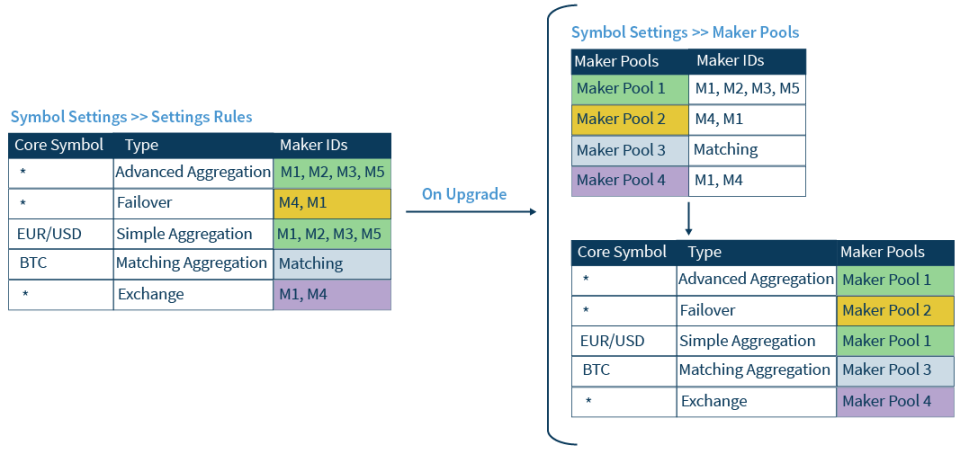
Makers, that you have already added in your Settings Rules, are automatically upgraded and put into default Maker Pools, based on the Maker Entities in the rule and their order. As shown in the image below, when Makers are identical between rules, a new Maker Pool is created and shared between the rules. However, when the order of the Makers is different, even if it’s the same Maker Entity, separate Maker Pools are created to ensure the smooth functioning of your Hub operations. After you upgrade, you must manually configure and define your Maker Pools. You must also specify a Maker Stream ID within your chosen Maker Entity to source liquidity.
Note: To learn more about the upgrade process in version 9.1+, see the Maker Pools 9.1+.
Viewing and Editing Row-Level Settings
- To view row-level settings, click the arrow on the left.
- To move a row, click and drag and drop the row.
- To delete a row, double click .
- To duplicate a row, click .